The Item Transfer system is an advanced utility feature that allows you to automatically transfer your items, Yang, and Won between different characters.
The Item Transfer system is an advanced utility feature that allows you to automatically transfer your items, Yang, and Won between different characters. It is especially designed for users who want to regularly transfer items from farming accounts to storage characters or selling characters.
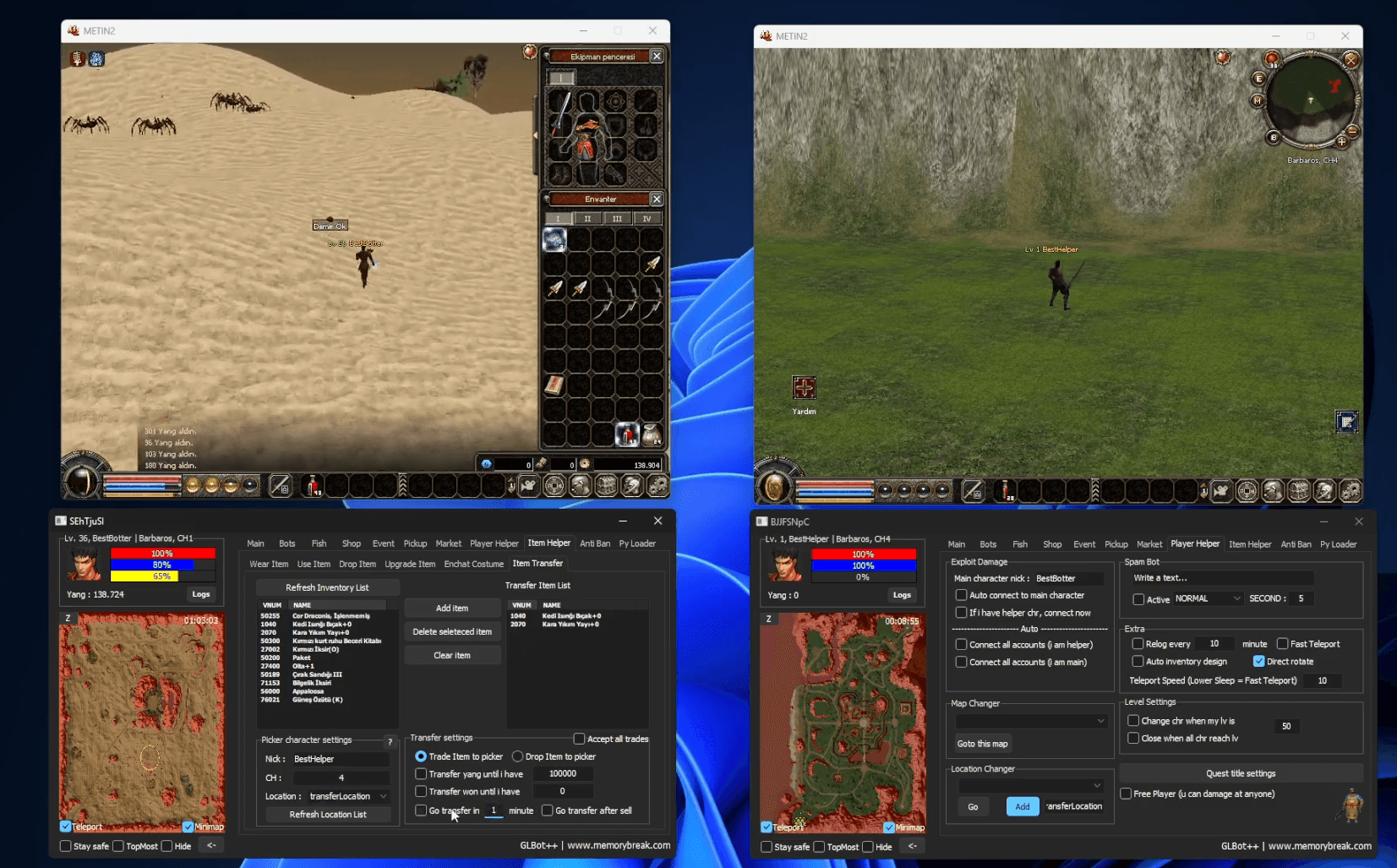
First, you can select the items to be transferred from the "Inventory List" section on the left and add them to the "Transfer Item List". Then you simply need to set the character information and transfer method.
"Refresh Inventory List": Rescans your inventory and loads the current item list. "Add Item": Adds the selected item to the transfer list. "Delete Selected Item": Removes the selected item from the transfer list. "Clear Item": Completely clears the transfer list.
Picker Character Settings — "Nick": Specifies the name of the character the items will be sent to. "CH": Determines the channel for the transfer. "Location": Allows you to select the meeting point location. The bot automatically goes to this point when needed.
Transfer Settings — "Trade Item to Picker": Transfers items to the target character through the trade window. "Drop Item to Picker": Drops items on the ground for the target character to pick up. "Transfer Yang Until I Have": Keeps the specified amount of Yang on the character and transfers the remaining Yang to the target. "Transfer Won Until I Have": Keeps the specified amount of Won on the character and transfers the rest.
"Go Transfer in X Minute": Automatically starts the transfer process when the set time expires. "Go Transfer After Sell": Automatically transfers after sales are completed. "Accept All Trades": Automatically accepts all incoming trade requests.
The bot automatically goes to the specified channel and location. It then meets the target character and transfers items according to the selected method. If Yang or Won is to be transferred, the trade method must be used. This allows you to safely and quickly send all your savings to your main character or storage account.
For players using multiple accounts, the Item Transfer system saves a great deal of time by eliminating the need for manual trading and character switching.
The Item Transfer experience most preferred by users is offered within MemoryBreak GLBot++.