Item Sell is an advanced system that automatically sells specific items in your inventory to NPCs, simplifying inventory management during long farming sessions.
Item Sell is an advanced system that automatically sells specific items in your inventory to NPCs, simplifying inventory management. It is especially useful for players who farm for extended periods, automatically clearing unnecessary items.
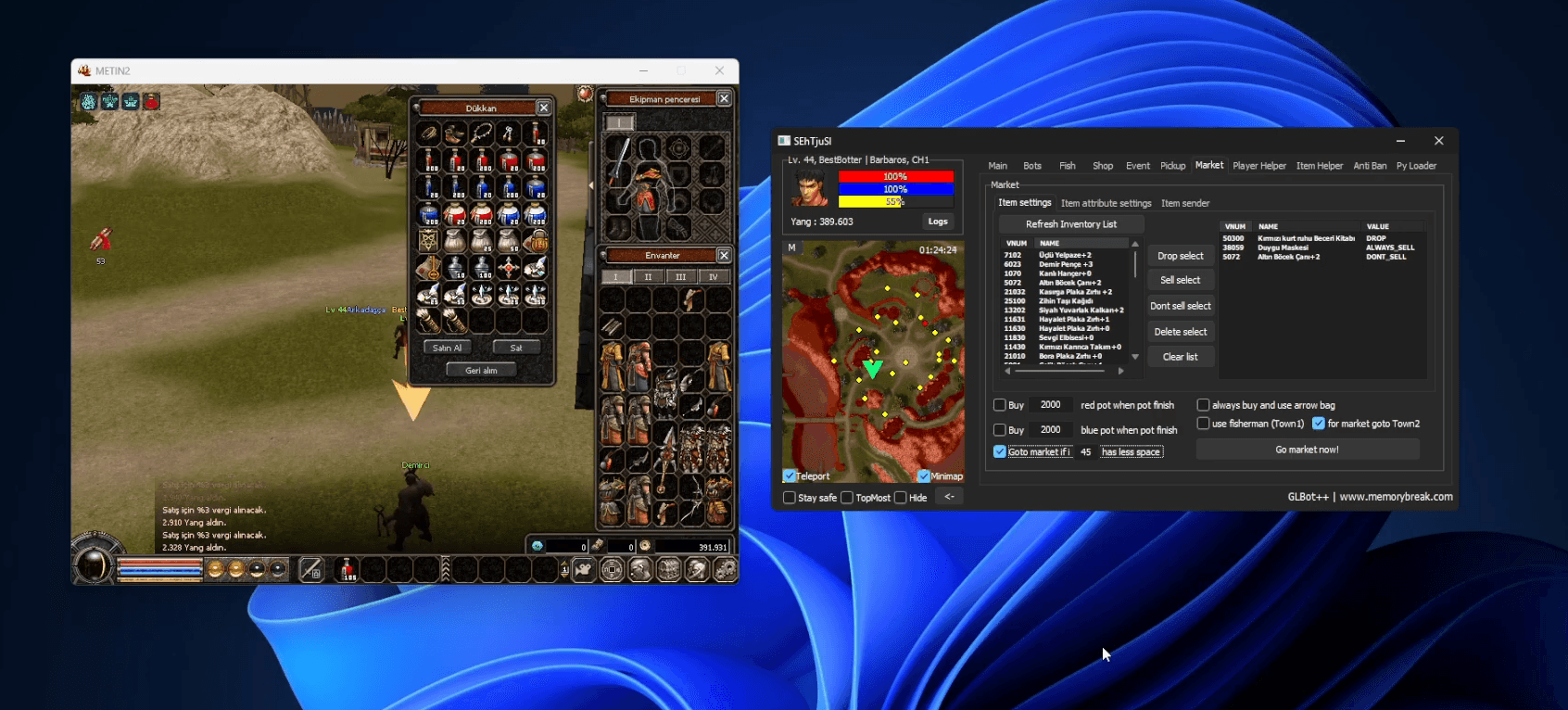
First, click the "Refresh Inventory List" button to scan your inventory and add the items you want to sell to the list. You can then set different selling rules for each item.
"Sell Select": Adds selected items to the sell list. "Don't Sell Select": Prevents selected items from being sold and adds them to the protection list. "Drop Select": Drops selected items on the ground instead of selling. "Delete Select": Removes the selected rule from the list. "Clear List": Clears the entire sell list.
Item Attribute Settings — "Always Sell": Automatically sells the item as soon as it is found. "Drop Sell": Drops the item on the ground instead of selling to an NPC. "Don't Sell": The item will never be sold under any circumstances.
"Buy Red Pot When Pot Finish": Automatically purchases red potions when they run out. "Buy Blue Pot When Pot Finish": Automatically purchases blue potions when they run out. "Always Buy And Use Arrow Bag": For characters using arrows, continuously buys and uses arrow bags.
"Use Fisherman (Town2)": Uses the fisherman NPC when needed. "Go Market If Have Less Space": When the inventory falls below the specified number of free slots, the character automatically goes to the market or selling point. "Go Market Now!": Sends the character to the market immediately for selling.
During long farming sessions, a full inventory significantly reduces farming efficiency. With the Item Sell system, worthless items are automatically sold, necessary consumables are repurchased, and your character continues farming without interruption.